
Excel has real value, especially in the early stages of a business. For many companies, spreadsheets solve practical problems remarkably well. A business might create one spreadsheet for orders, another for inventory and perhaps a third for purchasing or manufacturing. Everyone knows where to enter the information, and managers can still keep track of the key figures themselves.
As the company grows, however, this way of working starts to expose its limitations. Where is the latest version of the file? Who changed the stock level? Has the warehouse received the order? Is the production team working with the latest information? Why is the report still being prepared manually when the data already exists elsewhere in the business?
Companies usually start considering a move from Excel to ERP not because spreadsheets are inherently bad. More often, the business has simply become too complex for one file or a collection of separate spreadsheets to support day-to-day operations reliably.
One of the first signs is having several versions of the same spreadsheet. One employee works with the latest file, another has an older copy, and the manager is no longer sure which figures to rely on.
Another sign is employees having to re-enter the same data manually. An order is entered in one spreadsheet, inventory movements are recorded elsewhere, and the same information is then passed on to accounting. Every manual transfer introduces another opportunity for error.
Another warning sign is having to check inventory, orders or production status across several sources. If the warehouse sees one number, sales sees another and the spreadsheet shows a third, the problem is no longer just the Excel file itself.
Excel also becomes a constraint when reports have to be prepared manually. The company already has the data, but someone still needs to collect it, check it, reconcile the sources and only then prepare the report for management.
There is also a clear operational risk when a critical workflow depends on one employee’s knowledge. If only one person knows which spreadsheet is correct, what a particular column means and when the data needs to be updated, the company becomes heavily dependent on that individual.
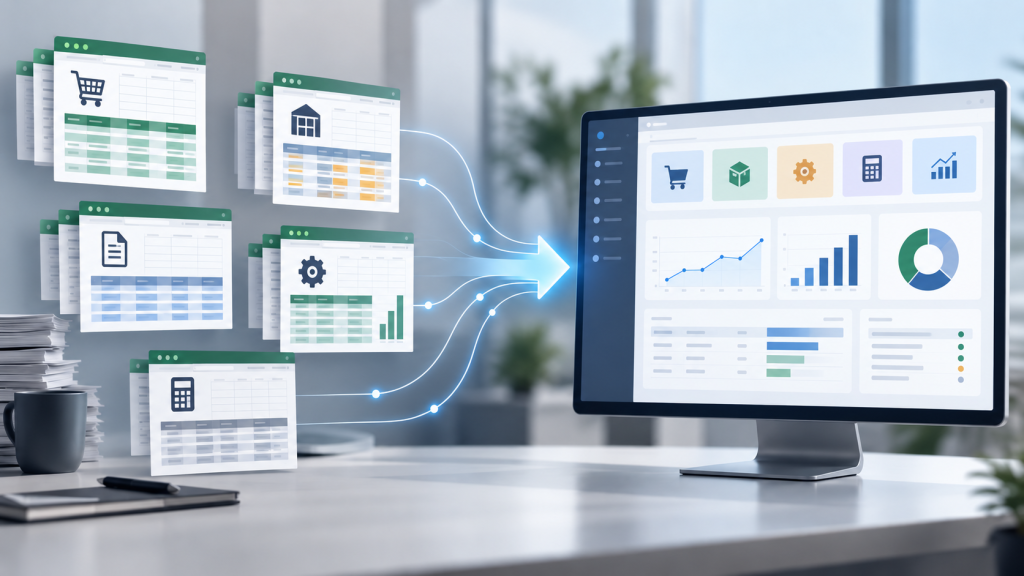
Excel spreadsheets usually do not create process problems. They make existing problems easier to see.
The spreadsheet itself may be perfectly well structured. But if it is unclear who enters the data, when it is updated, who checks it and where it is used later, the same problem will simply carry over into the new system.
That is why an ERP project should not begin with the question of which system to choose. The first step is to understand how the business actually operates today.
Where is the data first entered? Who approves it? Where is the same information entered again? Which team receives information too late? Which decisions still depend on separate spreadsheets?
The answers help determine whether the company simply needs better-organised spreadsheets and clearer workflows or whether it is time to consider an ERP system.
An ERP system will not automatically fix poor-quality data. If duplicate, inaccurate or inconsistently structured data is migrated into the new system, the same problems will simply appear there.
Not necessarily.
Excel can remain useful for ad hoc calculations, analysis or one-off data preparation. The risk arises when Excel becomes the main place for managing orders, inventory, manufacturing, purchasing or data needed for accounting.
If the same data is needed by several departments and constantly has to be copied, checked and reconciled, it is worth asking whether that work should move into an ERP system.
In other words, the goal is not to ban Excel. The goal is to make sure that critical business processes do not depend on separate files and manual corrections.
Before replacing Excel with an ERP system, it is worth reviewing both the data and the underlying workflows. If inaccurate, duplicated or inconsistently structured data is migrated into the new system, it will continue to create problems there.
Start by mapping the main workflows. For example, look at how an order is received, how inventory is checked, how goods are purchased, how production is managed and how information reaches accounting.
Then review the spreadsheets themselves. Which ones are the main sources of information, and which simply duplicate data that already exists elsewhere? Where is the data first recorded? Which columns are genuinely needed, and which are there only because of an old way of working?
The goal is not to recreate every spreadsheet in the ERP system. Instead, the focus should be on the data and workflows shared across several departments, particularly those that directly affect orders, inventory, manufacturing, purchasing or accounting.
It is also worth standardising names, removing duplicates and clarifying responsibilities before the migration begins. Products, customers, suppliers, stock records and orders should follow consistent naming rules. Employees should know who enters the data, who checks it and when it needs to be updated.
When moving from Excel to Odoo, the first step is to analyse the logic behind the existing spreadsheets and workflows. The Sandas team reviews which spreadsheets are being used, what data they contain and where the flow of information begins to break down.
The data itself is then reviewed. Not everything stored in Excel needs to be migrated into the ERP system. Some information may need to be cleaned up or consolidated. Other records may no longer be needed at all, while naming conventions or data structures may need to be reorganised before migration.
The next question is which Odoo modules are required and how the system should support the business. For one company, the priority may be sales and inventory. For another, it may be manufacturing. Others may need accounting, purchasing or project management first.
Once the system is configured, data migration and testing can begin. Testing should cover not only whether the data has migrated correctly, but also whether everyday workflows function as expected.
Finally, employees are trained, the system goes live and support is provided after launch. This matters because moving from spreadsheets to ERP means changing not only the tool, but also the way people work.
An ERP system is not always necessary for a small company.
If processes are simple, there is relatively little data and the team can operate effectively using spreadsheets, there may be no reason to start an ERP project yet.
Sometimes a small business first needs clearer workflows and better-organised data rather than a new system. The question is not simply whether the company wants a different tool, but whether the current way of working is genuinely making day-to-day operations more difficult.
Company size, however, is not the only factor.
A small business may still have a complex warehouse, a large product range or several sales channels. It may run manufacturing operations and have substantial purchasing and accounting requirements. In that situation, spreadsheets can become a constraint much earlier than expected.
The key question is therefore not how large the company is, but how complex its operations have become. If Excel no longer helps employees make decisions and instead forces them to repeatedly check the same information, it may be worth assessing whether an ERP system would better support the way the business operates.
The cost of replacing Excel with an ERP system depends on how many spreadsheets the company uses, what data they contain, how many workflows need to be connected and whether integrations with other systems are required.
When moving away from Excel, data preparation can account for a significant part of the work. If spreadsheets contain many duplicates, inconsistent naming conventions, manual corrections or columns with unclear meaning, more time will be needed to prepare the information for migration.
The overall cost also depends on Odoo module configuration, data migration, customisations, integrations, testing, employee training and post-launch support.
The timeline depends on the company’s level of preparation as well. The clearer the company is about which spreadsheets matter, which data can be trusted and which workflows those spreadsheets support, the easier it is to plan the transition accurately.
For that reason, an accurate estimate of cost and timeline can only be made once it is clear what Excel is currently doing for the business and which of those activities the ERP system will need to take over.
You do not need a complete technical specification before the first consultation.
It is far more useful to come prepared with a realistic picture of how the company works today.
It helps to prepare:
This makes it easier to understand whether the main problem lies in the data, the workflows, the lack of a shared system or several tools that do not communicate with one another.
Sandas starts the transition from Excel to ERP by reviewing the existing spreadsheets and workflows. The team analyses where spreadsheets are currently used, what data they contain and where the flow of information begins to break down.
The next step is to determine what can be handled using standard Odoo functionality, where configuration or customisation will be required and where integrations or a more tailored solution may be necessary.
Sandas helps prepare data for migration, configures Odoo to support the company’s actual workflows, carries out testing, trains employees and provides support after go-live. Clients also have access to the Sandas support line when they need help using the system.
Excel is usually no longer enough when several versions of the same data begin to appear, employees have to re-enter information manually, inventory or orders must be checked across several sources, and reports are still prepared by hand.
Not necessarily. Excel can remain useful for ad hoc calculations or analysis. What matters is that it does not become the main system for managing orders, inventory, manufacturing or data needed for accounting.
An ERP system can be useful for a small business when its operations have become complex — for example, when there are many products, orders, warehouse transactions, production stages or recurring data checks.
The decision should therefore be based not only on company size, but also on operational complexity.
The timeline depends on the number of spreadsheets, the quality of the data, the scope of the workflows, required integrations and how well prepared the employees are.
If the data is well organised, the transition is easier to plan. If the spreadsheets contain many duplicates or inconsistent, poorly documented logic, more time will be needed for preparation.
Start by reviewing the existing spreadsheets and workflows. Then identify where the data is created, who checks it, where it is re-entered and which activities the ERP system should eventually take over.
If Excel is no longer simplifying work and instead requires employees to keep checking, correcting and re-entering the same information, start by reviewing the workflows behind those spreadsheets.
For the first discussion, you do not need a perfect process description. Bring the spreadsheets you actually use today, along with the recurring issues or manual tasks that take up the most time. These usually provide the clearest indication of whether ERP is worth considering.
The Sandas team can help assess whether your company is ready to move from Excel to an ERP system and what practical preparation would be required.
Gaukite naujienas ir pasiūlymus el. paštu.